Events
In the previous tutorial we covered retrieving information about the game that can change at any time, but we relied on manually pressing the UI button in order to trigger reading that information. In this tutorial we introduce the concept of events, which are ways of having your plugin run or rerun parts of itself whenever certain conditions are met.
Previous tutorial
This tutorial assumes you have already completed the previous tutorial, and have a main.lua file with UI elements and config lookup in which to copy snippets of code.
Objectives
- Types of event
- Subscribing to events
- Creating callbacks
What is an event
Terminology:
- Event: Something that happens in the game, which can cause parts of the plugin to run.
- Callback: the function that should be run when the event happens.
- Subscribe: the act of linking the callback to the event, so that the event causes the callback.
- Payload: when the event is triggered, the event's payload contains additional information about the event.
One event has already been introduced, which is pressing the button that was added to the plugin UI:
Info
For this example:
- The event is
ui.Hook.ONBUTTONPRESSED, specifically for themyButtonUI component. - The callback is the
buttonPressfunction. - The line as a whole is subscribing to the event, and specifying the callback.
- The payload for this event is nothing, as there is no extra information needed related to pushing the button.
Events can also be unsubscribed if they are no longer needed, so your plugin doesn't need to always be subscribed to all events it might want to use.
Types of event
There are lots of types of event, and each one has a different payload. We will go over 3 events that may be used in relation to our friend, the stray dog.
NPCEntityAdded and NPCEntityRemoved
Whenever an NPC entity is added to the client, whether by spawning, moving close enough to the player, or the player moving close enough to it, the NPCEntityAdded event will activate. The payload for this event contains the NPCEntity that was added. Similarly, when an NPC entity is removed from the client by the inverse of any of the above reasons, the NPCEntityRemoved event will activate.
We can use these events to trigger any code we want in the callback.
Example
-- Code section 8 version 3
-- Subscribe to dogs being added
local function newEntity(event)
    if event.npcEntity.name==strayDogName then
        myText.content = "There is a dog :)"
    end
end
Event.NPCEntityAdded.Subscribe("dogAppearsEvent",newEntity)
This code snippet will create a callback function that updates the text on the button and the UI when a new stray dog is added to the client. The string "dogAppearsEvent" is naming this event subscription, in case we later want to change it or unsubscribe from it. Likewise we can add an event if the dog is removed from the client.
Example
Each of these events only triggers when the stray dog appears or disappears. Neither of these events will trigger when the plugin is first enabled, so it will not apply the text to the UI for either case.
Also note that having these events change the text on the UI does not interfere with the button press also changing the text on the UI. Each time the text is changed, it simply overwrites whatever is currently on that UI component with the new information.
ServerLogic
The previous event was only triggered when the NPCEntity was added or removed, so it was not able to update anything for a dog that was already present. To trigger more frequent callbacks, it is required to have a more frequent event that triggers them.
The ServerLogic event runs every time that the server finishes communicating with the client, which is every 0.6 seconds and commonly referred to as a "tick" among players, and allows for callbacks to be run every time this happens. This event has no payload, it simply happens regularly.
To make use of this to change the button text:
Example
-- Code section 10
-- Check every server cycle for dogs
local function checkForDogs()
    local localDogs = NPCList.ByName(strayDogName)
    if #localDogs==0 then
        myButton.label = "404 error dog not found"
    else
        myButton.label = "Show me where the dog is"
    end
end
Event.ServerLogic.Subscribe("serverLogicEvent",checkForDogs)
This code will check every server cycle for the presence of a nearby dog, and update the button accordingly. It does not update the UI text though, which will still get changed by the NPCEntityAdded and NPCEntityRemoved events.
MiniMenuEntrySelected
The previous events were all unrelated to player input, they simply triggered whenever a dog was nearby or not. The last event used in this tutorial is to subscribe to a minimenu event. The minimenu is the set of options that appears when right clicking any interactive game entity.
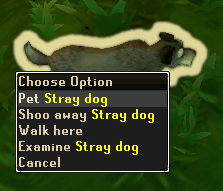
The MiniMenuEntrySelected is an event that occurs whenever a minimenu entry is selected. This also includes the left-click option on any game entity, since this is simply a shortcut for selecting the top minimenu entry. The payload for this event contains lots of information such as the entity, the action, the action type, and the verb used.
Example
-- Code section 11
-- Check every minimenu interactions with dogs
local function checkForMinimenu(event)
    if event.entry.npcData~=nil and event.entry.npcData.entity.config.name==strayDogName and event.entry.verbText=="Pet" then
        myText.content = "You have pet the dog<br>It is happy"
    elseif event.entry.npcData~=nil and event.entry.npcData.entity.config.name==strayDogName and event.entry.verbText=="Shoo away" then
        myText.content = "You have shoo'd the dog<br>You monster"
    end
end
Event.MiniMenuEntrySelected.Subscribe("minimenuEvent",checkForMinimenu)
This callback function looks for three conditions before altering the text on the UI.
- Does the event have an associated NPC. If the minimenu option was for something else like a player or an object, it would not have NPC information. Without this condition, interacting with a non-NPC would crash the plugin.
- Does the NPC match the config for the stray dog.
- Which verb was selected.
Put all together, this snippet updates the text on the UI only when a stray dog is interacted with via the "Pet" or "Shoo away" options, and does nothing for any other minimenu selections. Something to note in the text is the <br> tag which makes the text display a line break.