ui.Button
Overview
ui.Component -> ui.Button
Buttons are the most basic interactive component available to users, triggering an action when clicked on. They can also be flagged as toggles, which changes the visual representation to reflect both on and off statuses.
Additionally, buttons can also be configured to react to user inputs in different ways, for example, deferring the button press action until the button has been released as opposed to immediately triggering it on a click-down event.
See ui.TriggerMode for more information on the available input handling modes.
Example
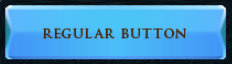
local myButton = ui.Button.new(parent)
myButton:SetSize(200, 50)
myButton.stylesheetID = button_style
myButton.label = "Regular Button"
-- or myButton.text.content = "Regular Button"
myButton:Subscribe(ui.Hook.ONBUTTONPRESSED,
    function (btn)
        log("Pressed button")
    end)
local myButton = ui.Button.new(parent)
myButton:SetSize(200, 50)
myButton.stylesheetID = toggle_button_style
myButton.canToggle = true
myButton.label = "Toggle Button"
myButton:Subscribe(ui.Hook.ONBUTTONPRESSED, "myHook",
    function (btn, toggledStatus)
        if toggledStatus then
            log("Button is toggled (param)")
        end

        if btn.isToggled then
            log("Button is toggled (property)")
        end
    end)

-- Later on
myButton:Unsubscribe(ui.Hook.ONBUTTONPRESSED, "myHook")
Enumerations
ui.TriggerMode
Contains the various options for how a button could be triggered by a user or the application.
| Value | Description |
|---|---|
| ONPRESS_FINISH | The button's action will be triggered once the button press animation finishes. |
| ONPRESS | The button's action will be triggered immediately after the user clicks/taps on the button. |
| ONRELEASE | The button's action will only be triggered once the user releases the click/tap on the button. |
| REPEAT | The button's action will trigger similarly to ONPRESS and will repeat every so often while held down. |
Methods
Constructor
function ui.Button.new(parent : ui.ComponentCollection, categoryID : Int?, dynamicID : Int?) -> Button
Creates a new button on the specified parent.
Warning
Creating a component can fail if there's already a component on that parent with the same category ID and dynamic ID, or if those are omitted and the application is unable to generate a valid ID for the component.
| Parameter | Type | Description |
|---|---|---|
| parent | ui.ComponentCollection | Parent component to create this button in. |
| categoryID | Int? | Category ID used to identify this component. Defaults to the parent's category ID if not specified. |
| dynamicID | Int? | Dynamic ID used to identify this component. Defaults to auto-incrementing from the parent's dynamic ID if not specified. |
| Returns | Description |
|---|---|
| Button | The newly created button. The caller must set its layout and visual information afterwards. |
SetAssociatedObject
Associates an object with this component, making it use the object's name and optionally it's quantity as the displayed contents for this component.
| Parameter | Type | Description |
|---|---|---|
| objectID | Int | Numeric ID for the object to associate with this component. |
| quantity | Uint64? | The quantity for the object to associate with this component. |
Properties
| Name | Type | Description |
|---|---|---|
| label | String | Text to display as this button's label, aliases text.content. |
| isToggled | Bool | Whether or not the button is toggled currently. Always false for non-toggle buttons. |
| canToggle | Bool | Controls whether this button can be toggled or not. |
| mode | ui.TriggerMode | Describes how user interactions are handled by this button. |
| associatedObjectID | Int | Numeric ID for the object associated with this component, or -1 if no associated object exists. |
| associatedObjectQuantity | Int | The quantity for the object associated with this component. |
| showAssociatedObjectText | Bool | Controls whether the button's label should be replaced with the associated object's text. Defaults to the actual label text if there's no associated object, or if it's invalid. |
| showAssociatedObjectSprite | Bool | Controls whether the sprite for the associated object will be displayed on top of the button's sprite. Does nothing if there's no associated object, or if it's invalid. |
| contentMargin | ui.Margin | Margin used to determine the label region for the button. |
| text | ui.TextData | Button label parameters. |
| sprite | ui.SpriteData | Button sprite parameters. |
Custom Visuals
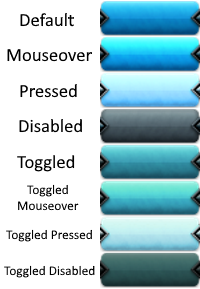
Using custom or plugin-provided sprites is supported, however the provided sprite must represent a spritesheet containing all of the potential states in a vertical layout using the following order - default, mouseover, pressed, disabled, toggled, toggled + mouseover, toggled + pressed, toggled + disabled.
Warning
Toggle states can be left blank on the sprite in the event that sprite will never be used for toggle buttons, however it's recommended to author those regardless to allow reusing that sprite with other button types.