ui.Slider
Overview
ui.Component -> ui.Slider
Sliders provide the user with a method of selecting a value out of a configurable range, represented as a track with a draggable thumb indicator, with labels for the various values along the track, and a central label indicating the currently selected value.
Similar to Carousels, there's also support for named entries, making them also useful for representing settings with multiple levels.
Example
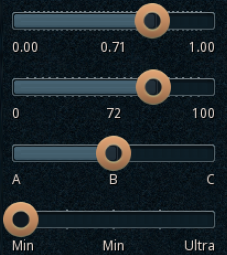
local selectionChangeReportPrint = function(component, id) print("Selection is now " .. tostring(id)) end

-- Setup specifying full slider params
local c = ui.Slider.new(parent)
c.stylesheetID = slider_default
c:SetSize(200, 50)
c:Subscribe(ui.Hook.ONSELECTIONCHANGED, selectionChangeReportPrint)

local minValue = 0
local maxValue = 1000
local curValue = 0
local valueDisplayDivisor = 1000
local incrementRate = 5
c:Setup(minValue, maxValue, curValue, valueDisplayDivisor, incrementRate)

-- Setup specifying only max + current
local c = ui.Slider.new(parent)
c.stylesheetID = slider_default
c:SetPos(0, 60)
c:SetSize(200, 50)
c:Subscribe(ui.Hook.ONSELECTIONCHANGED, selectionChangeReportPrint)

local maxValue = 100
local currentValue = 50
c:Setup(maxValue, currentValue)

-- Setup specifying a data mapping with explicit values + optional current value
local c = ui.Slider.new(parent)
c.stylesheetID = slider_default
c:SetPos(0, 120)
c:SetSize(200, 50)
c:Setup({ A = 2, B = 3, C = 4 }, 3)
c:Subscribe(ui.Hook.ONSELECTIONCHANGED, selectionChangeReportPrint)

-- Setup specifying a data mapping
local c = ui.Slider.new(parent)
c.stylesheetID = slider_default
c:SetPos(0, 180)
c:SetSize(200, 50)
c:Setup({ "Min", "Low", "Medium", "High", "Ultra" })
c:Subscribe(ui.Hook.ONSELECTIONCHANGED, selectionChangeReportPrint)
Methods
Constructor
function ui.Slider.new(parent : ui.ComponentCollection, categoryID : Int?, dynamicID : Int?) -> Slider
Creates a new slider on the specified parent.
Warning
Creating a component can fail if there's already a component on that parent with the same category ID and dynamic ID, or if those are omitted and the application is unable to generate a valid ID for the component.
| Parameter | Type | Description |
|---|---|---|
| parent | ui.ComponentCollection | Parent component to create this slider in. |
| categoryID | Int? | Category ID used to identify this component. Defaults to the parent's category ID if not specified. |
| dynamicID | Int? | Dynamic ID used to identify this component. Defaults to auto-incrementing from the parent's dynamic ID if not specified. |
| Returns | Description |
|---|---|
| Slider | The newly created slider. The caller must set its layout and visual information afterwards. |
Setup
function ui.Slider:Setup(max : Int, curValue : Int) -> Bool
function ui.Slider:Setup(min : Int, max : Int, curValue : Int, valueDisplayDivisor : Int, incrementRate : Int) -> Bool
function ui.Slider:Setup(entries : [String], selectedValue : Int?) -> Bool
function ui.Slider:Setup(entriesMap : { String -> Int }, selectedValue : Int?) -> Bool
Configures the value range for this slider and its current value, returning true if the provided data represents a valid range for a slider.
| Parameter | Type | Description |
|---|---|---|
| min | Int | Minimum value for this slider. Must be lower than max. |
| max | Int | Maximum value for this slider. Must be higher than min. |
| curValue | Int | Current value for this slider. Must be between min and max. |
| valueDisplayDivisor | Int | Divisor applied to this slider's value when it's being displayed. Used to display floating-point values while keeping an integer-only internal representation for values. |
| incrementRate | Int | Rate at which the slider transitions from min to max. |
| entries | [String] |
Array containing the name of the available entries. Each entry will be assigned an auto-incrementing value. |
| selectedValue | Int? | The value for the currently selected entry. If omitted, the first entry will be selected |
| entriesMap | { String -> Int } |
Table containing a string to integer mapping, representing entry names and their associated values. Note values must be unique. |
| Returns | Description |
|---|---|
| Bool | True if setup was successful, indicating the slider now has a valid range and is ready to be used. |
SetValue
Sets the current value for this slider.
| Parameter | Type | Description |
|---|---|---|
| value | Int | Desired current value for this slider. |
| triggerEvents | Bool? | Whether or not to emit ONSELECTIONCHANGED events for this change.Defaults to false. |
| Returns | Description |
|---|---|
| Bool | True if the provided value is representable by this slider and was set successfully, false otherwise. |
Properties
| Name | Type | Description |
|---|---|---|
| value | Int | The current value for the slider. Note modifying this triggers any potential value hooks set on this component, use SetValue instead if you need to skip those. |
| valueLabel | String | The name of the entry associated with the currently selected value, or an empty string if the slider setup didn't include entry names. |
| minValue | Int | (Read-only) The minimum value for this slider. |
| maxValue | Int | (Read-only) The maximum value for this slider. |
| numValues | Int | (Read-only) The number of values available on this slider. This takes into account minValue, maxValue, and rate. |
| scale | Int | (Read-only) Divisor applied on the current value when displaying it, allowing integer values to be displayed as floating-point. |
| rate | Int | The rate at which the slider transitions from minValue to maxValue.Also used to determine how often notches get displayed on the slider's track. |
| labelsText | ui.TextData | (Modifiable Contents) Text properties used when displaying this slider's text labels. |
| thumbSprite | ui.SpriteData | (Modifiable Contents) Sprite properties used for the slider's draggable thumb indicator. |
| trackSprite | ui.SpriteData | (Modifiable Contents) Sprite properties used for the slider's track. |
| notchSprite | ui.SpriteData | (Modifiable Contents) Sprite properties used for the notches on the slider's track. |
Custom Visuals
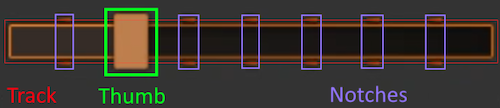
Using custom or plugin-provided sprites is supported, however the provided sprites used for the thumb and track must represent a spritesheet containing all of the potential states in a vertical layout.
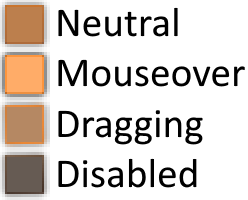
For the thumb the states are as follows: default/neutral, mouseover, dragging, disabled.
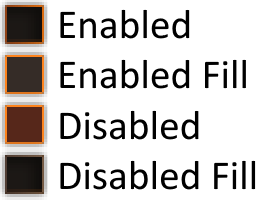
And for the track the states are as follows: default/enabled, default/enabled + filled region, disabled, disabled + filled region.