ui.Canvas
Overview
ui.Component -> ui.Canvas
Decorative component that provides functionality for drawing arbitrary 2D elements in a performant way.
Example
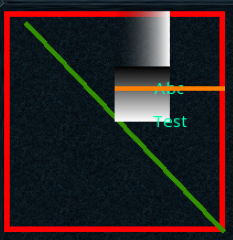
local c = ui.Canvas.new(parent)
c:SetSize(300, 300)

c:AddOutline(0, 0, 200, 200, 5, 0xFF0000FF)
c:AddLine(20, 10, 200, 200, 2, 0x339000FF)
c:AddGradientH(100, 0, 50, 50, 0x00000000, 0xFFFFFFFF)
c:AddGradientV(100, 50, 50, 50, 0x000000FF, 0xFFFFFFFF)

local reusableTextCfg = ui.TextDataConfig.new()
reusableTextCfg.font = museo_sans_15pt_regular
reusableTextCfg.alignHorizontal = ui.AlignMode.CENTRE
reusableTextCfg.alignVertical = ui.AlignMode.CENTRE
reusableTextCfg.colour = Vector4.new(0.0, 1.0, 0.7, 1.0)
c:AddText(100, 20, 100, 100, "Abc", reusableTextCfg)
c:AddText(100, 50, 100, 100, "Test", reusableTextCfg)
c:AddLine(100, 70, 200, 70, 2, Vector4.new(1.0, 0.5, 0.0, 1.0))
Methods
Constructor
function ui.Canvas.new(parent : ui.ComponentCollection, categoryID : Int?, dynamicID : Int?) -> Canvas
Creates a new canvas on the specified parent.
Warning
Creating a component can fail if there's already a component on that parent with the same category ID and dynamic ID, or if those are omitted and the application is unable to generate a valid ID for the component.
| Parameter | Type | Description |
|---|---|---|
| parent | ui.ComponentCollection | Parent component to create this canvas in. |
| categoryID | Int? | Category ID used to identify this component. Defaults to the parent's category ID if not specified. |
| dynamicID | Int? | Dynamic ID used to identify this component. Defaults to auto-incrementing from the parent's dynamic ID if not specified. |
| Returns | Description |
|---|---|
| Canvas | The newly created canvas. The caller must set its layout and visual information afterwards. |
AddLine
function ui.Canvas:AddLine(x : Int, y : Int, endX : Int, endY : Int, thickness : Float, colourRGBA : Uint)
function ui.Canvas:AddLine(x : Int, y : Int, endX : Int, endY : Int, thickness : Float, colour : Vector4)
Adds a line to the list of drawable elements for this canvas.
| Parameter | Type | Description |
|---|---|---|
| x | Int | Starting horizontal position for this element. |
| y | Int | Starting vertical position for this element. |
| endX | Int | Final horizontal position for this element. |
| endY | Int | Final vertical position for this element. |
| thickness | Float | This element's width in interface units. |
| colourRGBA | Uint | Hex colour code for this element. |
| colour | Vector4 | Colour for this element. |
AddOutline
function ui.Canvas:AddOutline(x : Int, y : Int, width : Int, height : Int, thickness : Float, colourRGBA : Uint)
function ui.Canvas:AddOutline(x : Int, y : Int, width : Int, height : Int, thickness : Float, colour : Vector4)
Adds a hollow rectangle to the list of drawable elements for this canvas.
| Parameter | Type | Description |
|---|---|---|
| x | Int | Horizontal position for this element. |
| y | Int | Vertical position for this element. |
| width | Int | Width for this element. |
| height | Int | Height for this element. |
| thickness | Float | Outline segment width in interface units. |
| colourRGBA | Uint | Hex colour code for this element. |
| colour | Vector4 | Colour for this element. |
AddRectangle
function ui.Canvas:AddRectangle(x : Int, y : Int, width : Int, height : Int, colourRGBA : Uint)
function ui.Canvas:AddRectangle(x : Int, y : Int, width : Int, height : Int, colour : Vector4)
Adds a filled rectangle to the list of drawable elements for this canvas.
| Parameter | Type | Description |
|---|---|---|
| x | Int | Horizontal position for this element. |
| y | Int | Vertical position for this element. |
| width | Int | Width for this element. |
| height | Int | Height for this element. |
| colourRGBA | Uint | Hex colour code for this element. |
| colour | Vector4 | Colour for this element. |
AddGradientH
function ui.Canvas:AddGradientH(x : Int, y : Int, width : Int, height : Int, startColourRGBA : Uint, endColourRGBA : Uint)
function ui.Canvas:AddGradientH(x : Int, y : Int, width : Int, height : Int, startColour : Vector4, endColour : Vector4)
Adds a rectangle containing a horizontal gradient to the list of drawable elements for this canvas.
Info
The start colour is used for leftmost point of the gradient, while the end colour is used for the rightmost point, with the gradient blending between those from left to right.
| Parameter | Type | Description |
|---|---|---|
| x | Int | Horizontal position for this element. |
| y | Int | Vertical position for this element. |
| width | Int | Width for this element. |
| height | Int | Height for this element. |
| startColourRGBA | Uint | Hex colour code for the starting colour for this element. |
| endColourRGBA | Uint | Hex colour code for the end colour for this element. |
| startColour | Vector4 | Starting colour for this element. |
| endColour | Vector4 | End colour for this element. |
AddGradientV
function ui.Canvas:AddGradientV(x : Int, y : Int, width : Int, height : Int, startColourRGBA : Uint, endColourRGBA : Uint)
function ui.Canvas:AddGradientV(x : Int, y : Int, width : Int, height : Int, startColour : Vector4, endColour : Vector4)
Adds a rectangle containing a horizontal gradient to the list of drawable elements for this canvas.
Info
The start colour is used for topmost point of the gradient, while the end colour is used for the bottommost point, with the gradient blending between those from top to bottom.
| Parameter | Type | Description |
|---|---|---|
| x | Int | Horizontal position for this element. |
| y | Int | Vertical position for this element. |
| width | Int | Width for this element. |
| height | Int | Height for this element. |
| startColourRGBA | Uint | Hex colour code for the starting colour for this element. |
| endColourRGBA | Uint | Hex colour code for the end colour for this element. |
| startColour | Vector4 | Starting colour for this element. |
| endColour | Vector4 | End colour for this element. |
AddTriangle
function ui.Canvas:AddTriangle(p0X : Int, p0Y : Int, p1X : Int, p1Y :Int, p2X : Int, p2Y : Int, colourRGBA : Uint)
function ui.Canvas:AddTriangle(p0X : Int, p0Y : Int, p1X : Int, p1Y :Int, p2X : Int, p2Y : Int, colour : Vector4)
Adds a coloured triangle to the list of drawable elements for this canvas.
| Parameter | Type | Description |
|---|---|---|
| p0X | Int | Horizontal position for the triangle's first vertex. |
| p0Y | Int | Vertical position for the triangle's first vertex. |
| p1X | Int | Horizontal position for the triangle's second vertex. |
| p1Y | Int | Vertical position for the triangle's second vertex. |
| p2X | Int | Horizontal position for the triangle's third vertex. |
| p2Y | Int | Vertical position for the triangle's third vertex. |
| colourRGBA | Uint | Hex colour code for this element. |
| colour | Vector4 | Colour for this element. |
AddSprite
function ui.Canvas:AddSprite(x : Int, y : Int, width : Int, height : Int, spriteID : Int, colourRGBA : Uint)
function ui.Canvas:AddSprite(x : Int, y : Int, width : Int, height : Int, spriteID : Int, uvs : Rect, colourRGBA : Uint)
function ui.Canvas:AddSprite(x : Int, y : Int, width : Int, height : Int, spriteID : Int, uvs : Rect, spriteConfig : ui.SpriteDataConfig)
Adds a sprite to the list of drawable elements for this canvas.
| Parameter | Type | Description |
|---|---|---|
| x | Int | Horizontal position for this element. |
| y | Int | Vertical position for this element. |
| width | Int | Width for this element. |
| height | Int | Height for this element. |
| spriteID | Int | Numeric ID for the sprite to draw. |
| colourRGBA | Uint | Hex colour code for this element. |
| uvs | Rect | Rectangle identifying the UV coordinates to use when drawing this sprite. Used to draw a specific element from a spritesheet. |
| spriteConfig | ui.SpriteDataConfig | Collection of parameters used for drawing this sprite. |
AddText
function ui.Canvas:AddText(x : Int, y : Int, text : String, fontID : Int, colourRGBA : Uint)
function ui.Canvas:AddText(x : Int, y : Int, text : String, fontID : Int, colour : Vector4)
function ui.Canvas:AddText(x : Int, y : Int, text : String, textConfig : ui.TextDataConfig)
function ui.Canvas:AddText(x : Int, y : Int, areaWidth : Int, areaHeight : Int, text : String, textConfig : ui.TextDataConfig)
Adds a block of text to the list of drawable elements for this canvas.
| Parameter | Type | Description |
|---|---|---|
| x | Int | Horizontal position for this element. |
| y | Int | Vertical position for this element. |
| text | String | The text to draw. |
| fontID | Int | Numeric ID for the font used when drawing this block of text. |
| colourRGBA | Uint | Hex colour code for this element. |
| colour | Vector4 | Colour for this element. |
| textConfig | ui.TextDataConfig | Collection of parameters used for drawing this block of text. |
| areaWidth | Int | Width of the region where this text will be displayed. |
| areaHeight | Int | Height of the region where this text will be displayed. |
Clear
Removes all drawables elements from this canvas.
Undo
Removes the element most recently added to this canvas.
Properties
| Name | Type | Description |
|---|---|---|
| numElements | Int | Returns the number of drawable elements present on this canvas. |