ui.ModelGroup
Overview
ui.Component -> ui.ComponentCollection -> ui.ModelGroup
Model group components contain a set of models meant to be rendered together.
They're meant to work together with Model components, modifying their rendering so they appear in the same scene, and also providing a more robust camera model.
Warning
Adding non-model components to model groups is unsupported and will result in a script error.
Example
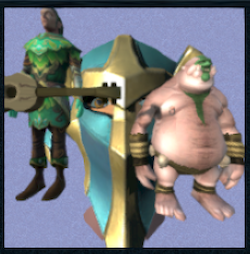
-- Create the camera used for this modelgroup
local camera = ui.ModelCamera.new()
camera:SetFOV(90.0, 0.0)
camera:SetPosition(Vector3.new(0.0, 0.0, -1000.0), 0.0)
camera:SetLookAt(Vector3.new(0.0, 0.0, 0.0), 0.0)
camera.clearColour = Vector4.new(0.3, 0.3, 0.5, 0.3)
camera.useLookAt = true

-- Create the actual model group component
local modelGroup = ui.ModelGroup.new(parent)
modelGroup:SetSize(200, 200)
modelGroup:SetPos(220, 0)
modelGroup:SwitchCamera(modelGroup:AddCamera(camera), ui.ModelCameraTransition.NONE, -1, 0.0)

-- Create the models within the modelgroup
local models =
{
    { id = id.Model.6AWE2_BANDOS_WAR_DRUMMER, pos = Vector3.new(500.0, -600.0, 0.0), scale = 1.0 },
    { id = id.Model.HUMAN_COMBAT_ZAROS_RIDER_MELEE_F_CHATHEAD, pos = Vector3.new(0.0, 200.0, 10000.0), scale = 10.0 },
    { id = id.Model.ELF_2014_GUITARIST02, pos = Vector3.new(-500.0, -400.0, -200.0), scale = 1.5 }
}

for i,v in ipairs(models) do
    local subModel = ui.Model.new(modelGroup)
    subModel:SetSize(200, 200)
    subModel:SetModel(ui.ModelType.MODEL, v.id)
    subModel:SetTransform(v.pos, Vector3.new(0.0), Vector3.new(v.scale), 0.0)
end
Enumerations
ui.ModelCameraTransition
Determines how transitions between multiple model group cameras are handled visually.
| Value | Description |
|---|---|
| NONE | The transition happens immediately. |
| FADE | The transition source fades out over time. |
| CROSSFADE | The transition source fades out as the transition target fades in. |
Types
ui.ModelCamera
Helper type representing a camera to be used by model group components for rendering.
Methods
StartTransition
function ui.ModelCamera:StartTransition(transition : ui.ModelCameraTransition, maskSpriteID : Int, durationMs : Uint)
Starts a transition to this camera using the provided sprite mask.
Warning
Avoid using this directly as camera transitions should be managed by model group components.
| Parameter | Type | Description |
|---|---|---|
| transition | ui.ModelCameraTransition | Determines how the visibility for this transition should be calculated over time. |
| maskSpriteID | Int | Numeric ID associated with a sprite for use as a mask for this transition. |
| durationMs | Uint | Determines how long this transition lasts for in milliseconds. |
ClearTransition
Resets the transition for this camera, reverting to the initial state.
Warning
Avoid using this directly as camera transitions should be managed by model group components.
SetFOV
Changes the field-of-view for this camera over the specified duration.
| Parameter | Type | Description |
|---|---|---|
| fov | Float | Desired field-of-view in degrees. Defaults to 90.0. |
| durationMs | Uint | Determines how long this change takes in milliseconds. |
SetPosition
Changes the origin for this camera over the specified duration.
| Parameter | Type | Description |
|---|---|---|
| position | Vector3 | Desired origin for this camera. |
| durationMs | Uint | Determines how long this change takes in milliseconds. |
SetLookAt
Changes the target for this camera over the specified duration.
| Parameter | Type | Description |
|---|---|---|
| position | Vector3 | Desired target for this camera, used to determine its direction. |
| durationMs | Uint | Determines how long this change takes in milliseconds. |
SetYawPitchRoll
Changes the target for this camera over the specified duration.
| Parameter | Type | Description |
|---|---|---|
| yawPitchRoll | Vector3 | Desired rotations for this camera in radians. If not specified, the camera will point directly at its target as set based on SetPosition and SetLookAt. |
| durationMs | Uint | Determines how long this change takes in milliseconds. |
SetClipPlanes
Sets the clip planes which control the minimum and maximum distances at which objects are visible for this camera.
Warning
The value used for far must be larger than near.
| Parameter | Type | Description |
|---|---|---|
| near | Float | Minimum distance in world units from the camera before objects are visible. |
| far | Float | Maximum distance in world units from the camera before objects are visible. |
Properties
| Name | Type | Description |
|---|---|---|
| clearColour | Vector4 | Colour used for the background. |
| useLookAt | Bool | Determines whether the direction between position and lookAt is used for the camera, otherwise the camera defaults to looking straight ahead.Note this direction will be modified by yawPitchRoll. |
| transitionRatio | Float | (Read-only) Indicates how far along the current transition is, ranging from 0 (just started) to 1 (finished). |
| transitionType | ui.ModelCameraTransition | (Read-only) Type of the current transition, used to determine how the visibility for this camera should be calculated. |
| transitionMaskSprite | (Read-only) |
Numeric ID identifying the sprite to use as a mask for the current transition. |
| isTransitionInProgress | Bool | (Read-only) True if there's a transition happening currently. |
| isTransitionComplete | Bool | (Read-only) True if there's no transition currently in progress. |
| sortModelsUsingComponentOrder | Bool | Controls whether each model contained in this group is rendered separately in the order their components are set to draw, or all together in a single batch. This may be required for cases where there are multiple models with transparency effects present in the same group. |
| fov | Float | (Read-only) Current field-of-view in degrees for this camera. |
| position | Vector3 | (Read-only) Current origin position for this camera. |
| lookAt | Vector3 | (Read-only) Current target position for this camera. |
| yawPitchRoll | Vector3 | (Read-only) Current rotation in radians to be applied to the camera's direction. |
| nearPlane | Float | (Read-only) Current minimum distance in world units from the camera before objects are visible. |
| farPlane | Float | (Read-only) Current maximum distance in world units from the camera before objects are visible. |
Methods
Constructor
function ui.ModelGroup.new(parent : ui.ComponentCollection, categoryID : Int?, dynamicID : Int?) -> ModelGroup
Creates a new model group on the specified parent.
Warning
Creating a component can fail if there's already a component on that parent with the same category ID and dynamic ID, or if those are omitted and the application is unable to generate a valid ID for the component.
| Parameter | Type | Description |
|---|---|---|
| parent | ui.ComponentCollection | Parent component to create this model group in. |
| categoryID | Int? | Category ID used to identify this component. Defaults to the parent's category ID if not specified. |
| dynamicID | Int? | Dynamic ID used to identify this component. Defaults to auto-incrementing from the parent's dynamic ID if not specified. |
| Returns | Description |
|---|---|
| ModelGroup | The newly created model group. The caller must set its layout and visual information afterwards. |
AddCamera
function ui.ModelGroup:AddCamera() -> Int
function ui.ModelGroup:AddCamera(camera : ui.ModelCamera) -> Int
Adds a new defaulted camera, or a previously configured camera to the model group, returning its index.
| Parameter | Type | Description |
|---|---|---|
| camera | ui.ModelCamera | Previously setup camera to add to this model group. |
| Returns | Description |
|---|---|
| Int | Index for the newly added camera. |
DeleteCamera
Deletes the camera at the provided index if it exists.
| Parameter | Type | Description |
|---|---|---|
| cameraIndex | Int | The index of the camera to be removed. |
SwitchCamera
function ui.ModelGroup:SwitchCamera(
    cameraIndex : Int,
    transition : ui.ModelCameraTransition,
    transitionMaskSpriteID : Int,
    transitionDurationMs : Uint) -> Bool
Switches to the camera at the provided index if it exists, starting a transition effect with the specified parameters.
| Parameter | Type | Description |
|---|---|---|
| cameraIndex | Int | The index of the camera to switch to. |
| transition | ui.ModelCameraTransition | Determines how the visibility for this transition should be calculated over time. |
| transitionMaskSpriteID | Int | Numeric ID associated with a sprite for use as a mask for this transition. |
| transitionDurationMs | Uint | Determines how long this transition lasts for in milliseconds. |
| Returns | Description |
|---|---|
| Bool | True if the camera exists and a transition was successfully started, false otherwise. |
IsValidCameraID
Checks if there's a camera present at the specified index.
| Parameter | Type | Description |
|---|---|---|
| cameraIndex | Int | The index of the camera to check. |
GetCamera
Retrieves a copy of the camera present at the specified index.
| Parameter | Type | Description |
|---|---|---|
| cameraIndex | Int | The index of the camera to retrieve. |
| Returns | Description |
|---|---|
| ui.ModelCamera? | A copy of the camera present at the specified index, or nil if it's missing. |
Properties
| Name | Type | Description |
|---|---|---|
| activeCameraID | Int | (Read-only) The index of the currently active camera. |
| activeCamera | ui.ModelCamera? | (Read-only) A copy of the currently active camera, or nil if there isn't one. |