ui.GroupBox
Overview
ui.Component -> ui.ComponentCollection -> ui.GroupBox
GroupBoxes are similar to Layers, allowing components to be arbitrarily positioned and sized within them. Unlike other layout components however, groupboxes also contain some visual elements, namely a background sprite enclosing the component's contents, and an optional header section composed of a sprite and a label.
This makes groupboxes ideal for situations where you'd like to make it clear some UI elements are grouped or categorised together, or to highlight a section of an interface. They are also a good component container to use when creating a new interface since otherwise you would usually need to create and manage a separate background element.
Example
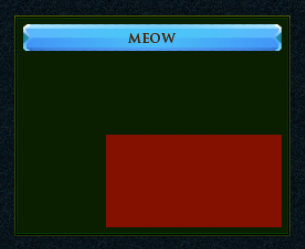
-- Create a groupbox
local myGroupBox = ui.GroupBox.new(parent)
myGroupBox.stylesheetID = groupbox_style
myGroupBox.colour = Vector4.new(1.0, 1.0, 0.0, 1.0)
myGroupBox:SetPos(50, 50)
myGroupBox:SetSize(250, 200)

-- Add some content
local button = ui.Button.new(myGroupBox)
button.stylesheetID = button_style
button.label = "Meow"
button:SetSize(0, 25, 1.0, 0.0)

local rect = ui.Rectangle.new(myGroupBox)
rect:SetPos(75, 100)
rect:SetSize(200, 200)
rect.colour = Vector4.new(1.0, 0.0, 0.0, 0.5)
rect.fill = true
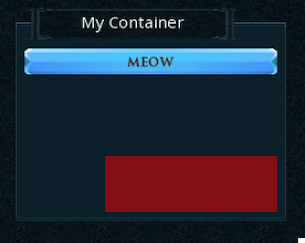
-- Create a groupbox
local myGroupBox = ui.GroupBox.new(parent)
myGroupBox.stylesheetID = groupbox_style
myGroupBox:SetPos(50, 50)
myGroupBox:SetSize(250, 200)

-- Setup the header
local headerWidth = 200
local headerHeight = 32
local headerOffsetX = 0
local headerOffsetY = 0
myGroupBox:SetHeaderLayout(headerWidth, headerHeight, headerOffsetX, headerOffsetY, ui.GroupBoxHeaderAlignMode.LEFT)
myGroupBox.headerText.content = "My Container"
myGroupBox.headerText.font = museo_sans_15pt_regular
myGroupBox.headerBackgroundSprite.sprite = groupbox_body_main_modal_32px

-- Add some content
local button = ui.Button.new(myGroupBox)
button.stylesheetID = button_style
button.label = "Meow"
button:SetSize(0, 25, 1.0, 0.0)

local rect = ui.Rectangle.new(myGroupBox)
rect:SetPos(75, 100)
rect:SetSize(200, 200)
rect.colour = Vector4.new(1.0, 0.0, 0.0, 0.5)
rect.fill = true
Enumerations
ui.GroupBoxHeaderAlignMode
Specifies how the groupbox header will be positioned horizontally.
Info
Headers are always positioned at the top of the component regardless of alignment.
| Value | Description |
|---|---|
| LEFT | The header is positioned against the left side of the component. |
| CENTRE | The header is centred on the component. |
| RIGHT | The header is positioned against the right side of the component. |
Methods
Constructor
function ui.GroupBox.new(parent : ui.ComponentCollection, categoryID : Int?, dynamicID : Int?) -> GroupBox
Creates a new GroupBox on the specified parent.
Warning
Creating a component can fail if there's already a component on that parent with the same category ID and dynamic ID, or if those are omitted and the application is unable to generate a valid ID for the component.
| Parameter | Type | Description |
|---|---|---|
| parent | ui.ComponentCollection | Parent component to create this groupbox in. |
| categoryID | Int? | Category ID used to identify this component. Defaults to the parent's category ID if not specified. |
| dynamicID | Int? | Dynamic ID used to identify this component. Defaults to auto-incrementing from the parent's dynamic ID if not specified. |
| Returns | Description |
|---|---|
| GroupBox | The newly created groupbox. The caller must set its layout and visual information afterwards. |
SetHeaderLayout
function ui.GroupBox:SetHeaderLayout(width : Uint8, height : Uint8, offsetX : Uint8, offsetY : Uint8, alignment : ui.GroupBoxHeaderAlignMode)
Sets the parameters used to position and size the component's header area.
Warning
Make sure your component's contents still fit when using a header, since the available height for content will be reduced based on the header's height and vertical offset.
| Parameter | Type | Description |
|---|---|---|
| width | Uint8 | The header's width in interface units. |
| height | Uint8 | The header's height in interface units. |
| offsetX | Uint8 | The header's offset from the left in interface units. |
| offsetY | Uint8 | The header's offset from the right in interface units. |
| alignment | ui.GroupBoxHeaderAlignMode | Defines how the header should be positioned. |
Properties
| Name | Type | Description |
|---|---|---|
| headerWidth | Uint8 | The header's width in interface units. |
| headerHeight | Uint8 | The header's height in interface units. |
| headerOffsetX | Uint8 | The header's offset from the left in interface units. |
| headerOffsetY | Uint8 | The header's offset from the right in interface units. |
| headerAlignment | ui.GroupBoxHeaderAlignMode | Defines how the header should be positioned. |
| headerText | ui.LabelData | (Modifiable Contents) Label properties used for the header text. |
| contentBackgroundSprite | ui.SpriteData | (Modifiable Contents) Sprite properties used for the background. |
| headerBackgroundSprite | ui.SpriteData | (Modifiable Contents) Sprite properties used for the header background. |
| contentMargin | ui.Margin | (Modifiable Contents) Offsets used to determine the inner content area for this component. |