ui.RadialProgressOverlay
Overview
ui.Component -> ui.RadialProgressOverlay
These components are a performant way to represent progression via an indicator that pans across radially as it advances. They support both automatic, time-based progression, and manual progression, making them ideal for elements like ability cooldown timers and skill experience trackers for example.
Example
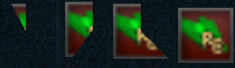
local c = ui.RadialProgressOverlay.new(panel)
c.maskSprite.sprite = my_sprite
c:SetSize(50, 50)
c:Subscribe(ui.Hook.ONSELECTIONCHANGED,
    function (c, value, progress)
        log("Progress is now", progress, "(", value - c.initialValue, "/", c.endValue - c.initialValue, ")")
    end)

-- Start a 10s timer and invert the overlay so it fades in from the left
c:Start(0, 10, ui.RadialProgressOverlayFlag.AUTOMATIC + ui.RadialProgressOverlayFlag.REVERSE)
local c = ui.RadialProgressOverlay.new(panel)
c.maskSprite.sprite = my_sprite
c:SetSize(50, 50)
c:Start(0, 10)

-- Set its progress
c.curValue = 3
Enumerations
ui.RadialProgressOverlayFlag
Enumeration containing flags used to control RadialProgressOverlay behaviour and visuals.
| Value | Description |
|---|---|
| AUTOMATIC | Indicates that once started, this overlay's progress will automatically advance over time. This is ideal for timer overlays. |
| REVERSE | Indicates the overlay starts filled and gradually depletes. |
| FLIP_HORIZONTAL | Inverts the overlay's visuals horizontally. |
| FLIP_VERTICAL | Inverts the overlay's visuals vertical. |
Methods
Constructor
function ui.RadialProgressOverlay.new(parent : ui.ComponentCollection, categoryID : Int?, dynamicID : Int?) -> RadialProgressOverlay
Creates a new radial progress overlay on the specified parent.
Warning
Creating a component can fail if there's already a component on that parent with the same category ID and dynamic ID, or if those are omitted and the application is unable to generate a valid ID for the component.
| Parameter | Type | Description |
|---|---|---|
| parent | ui.ComponentCollection | Parent component to create this radial progress overlay in. |
| categoryID | Int? | Category ID used to identify this component. Defaults to the parent's category ID if not specified. |
| dynamicID | Int? | Dynamic ID used to identify this component. Defaults to auto-incrementing from the parent's dynamic ID if not specified. |
| Returns | Description |
|---|---|
| RadialProgressOverlay | The newly created radial progress overlay. The caller must set its layout and visual information afterwards. |
Start
Sets the value range for this component and any additional flags to modify its behaviour.
Info
To have the overlay behave as a timer, pass ui.RadialProgressOverlayFlag.AUTOMATIC as part of the flags.
Note when using this flag, initialValue and endValue represent time in seconds.
| Parameter | Type | Description |
|---|---|---|
| initialValue | Float | The starting value for this overlay. |
| endValue | Float | The final value for this overlay. |
| flags | ui.RadialProgressOverlayFlag | Combination of flags used to determine how this radial is displayed and whether or not it should automatically progress after this function call. |
Properties
| Name | Type | Description |
|---|---|---|
| curValue | Float | The current value for this overlay, ranging between initialValue and endValue.This can be set, allowing the creation of progress indicators that don't start at initialValue. |
| initialValue | Float | (Read-only) The initial value for this overlay, as specified via Set. |
| endValue | Float | (Read-only) The final value for this overlay, as specified via Set. |
| progress | Float | (Read-only) The current progress percentage for this overlay, ranging from 0 to 1, representing 0% and 100% respectively. |
| maskSprite | ui.SpriteData | (Modifiable Contents) Sprite properties used for the overlay's visuals, normally used as a transparency mask. |