ui.Check
Overview
ui.Component -> ui.Check
Checks work similarly to a toggle button, however they're displayed differently, being represented as two separate elements - a label, and a toggleable button.
Example

local myCheck = ui.Check.new(parent)
myCheck:SetSize(200, 50)
myCheck.stylesheetID = check_style
myCheck.label = "Inline Check"
-- or myCheck.text.content = "Inline Check"
myCheck.alignment = ui.CheckAlignMode.INLINE
myCheck.buttonSize = 10
myCheck:Subscribe(ui.Hook.ONBUTTONPRESSED,
    function ()
        log("Pressed check")
    end)
local myCheck = ui.Check.new(parent)
myCheck:SetSize(200, 50)
myCheck.stylesheetID = check_style
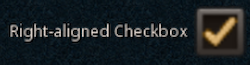
myCheck.label = "Right-aligned Check"
myCheck.alignment = ui.CheckAlignMode.RIGHT
myCheck.buttonSize = 40
myCheck:Subscribe(ui.Hook.ONBUTTONPRESSED, "myHook",
    function (check, ticked)
        if ticked then
            log("Check is ticked (param)")
        end

        if check.value then
            log("Check is ticked (property)")
        end
    end)

-- Later on
myCheck:Unsubscribe(ui.Hook.ONBUTTONPRESSED, "myHook")
Enumerations
ui.CheckAlignMode
Specifies how the contents of a check component should be positioned.
| Value | Description |
|---|---|
| INLINE | Contents are aligned to the left and the button appears after the label. |
| INLINE_INVERTED | Contents are aligned to the right and the button appears before the label. |
| LEFT | Contents are aligned to the left and the button appears before the label. |
| RIGHT | Contents are aligned to the right and the button appears after the label. |
Methods
Constructor
function ui.Check.new(parent : ui.ComponentCollection, categoryID : Int?, dynamicID : Int?) -> Check
Creates a new check on the specified parent.
Warning
Creating a component can fail if there's already a component on that parent with the same category ID and dynamic ID, or if those are omitted and the application is unable to generate a valid ID for the component.
| Parameter | Type | Description |
|---|---|---|
| parent | ui.ComponentCollection | Parent component to create this check in. |
| categoryID | Int? | Category ID used to identify this component. Defaults to the parent's category ID if not specified. |
| dynamicID | Int? | Dynamic ID used to identify this component. Defaults to auto-incrementing from the parent's dynamic ID if not specified. |
| Returns | Description |
|---|---|
| Check | The newly created check. The caller must set its layout and visual information afterwards. |
Properties
| Name | Type | Description |
|---|---|---|
| label | String | Text to display as this check's label, aliases text.content. |
| value | Bool | Indicates if the check is currently ticked or not. |
| alignment | ui.CheckAlignMode | Determines how the Check's label and button should be positioned. Defaults to ui.CheckAlignMode.LEFT |
| buttonSize | Int | Determines the size of the Check's button in interface units. Limited to a maximum of 255 units. Defaults to the component's height if not set, or set to 0. |
| text | ui.TextData | Check label parameters. |
| sprite | ui.SpriteData | Check sprite parameters. |
Custom Visuals
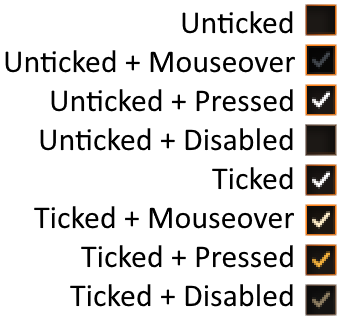
Using custom or plugin-provided sprites is supported, however the provided sprite must represent a spritesheet containing all of the potential states in a vertical layout using the following order - unticked, unticked + mouseover, unticked + pressed, unticked + disabled, ticked, ticked + mouseover, ticked + pressed, ticked + disabled.