ui.Model
Overview
ui.Component -> ui.Model
Model components provide functionality for rendering arbitrary models as part of the user interface, including models used by objects, npcs, and players.
Info
Multiple models can be combined into a scene by using model group components, otherwise models are rendered in isolation of eachother.
Example
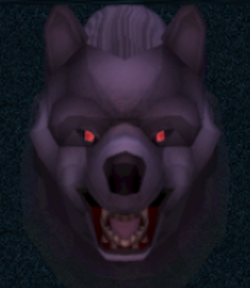
local model = ui.Model.new(parent)
model:SetSize(200, 200)

-- Configure the model and camera
model:SetModel(ui.ModelType.MODEL, id.Model.WEREWOLF_GENERIC_CHATHEAD)
model.viewDistance = 1000

-- Configure the environment
local ambient = 1.0
local contrast = 1.0
local antiContrast = 0.0
local sunRGB = Vector3.new(0.8, 0.4, 0.6)
local sunDirection = Vector3.new(0.0, 0.0, -1.0)
local envMapID = -1

model:SetLighting(ambient, contrast, antiContrast, sunRGB, sunDirection, envMapID)
Enumerations
ui.ModelType
Identifies how a generic model ID should be interpreted by a model component.
| Value | Description |
|---|---|
| NONE | No/invalid model. |
| MODEL | Plain model with no specialized game behaviour or usage. |
| NPC_HEAD | Model used in the chat interface for a NPC. |
| PLAYER_HEAD | Model used in the chat interface for a player.1 |
| OBJECT | Model used for an object. |
| PLAYER_MODEL | Model used for a player.1 |
| NPC_MODEL | Model used for a NPC. |
| PLAYER_HEAD_NOWORN | Model used in the chat interface for a player, without any items equipped.1 |
| INV_MANWEAR_MODEL | Gendered variant of a model for a wearable inventory item.2 |
| INV_WOMANWEAR_MODEL | Gendered variant of a model for a wearable inventory item.2 |
Types
ui.ModelEnvironment
Contains lighting and environment configuration data used for model rendering.
Info
New intances can be created using ui.ModelEnvironment.new(), and each instance can be used by any number of model components.
| Name | Type | Description |
|---|---|---|
| ambient | Float | Ambient lighting intensity. Note higher ambient values can result in "flat"-looking visuals. Defaults to 2.0. |
| contrast | Float | Contrast intensity. Defaults to 2.5. |
| anticontrast | Float | Contrast intensity for backface lighting. Currently unused, kept for legacy reasons. Defaults to 0. |
| sunRGB | Vector3 | Defaults to (1.0, 1.0, 1.0). |
| sunDirection | Vector3 | Defaults to (-0.7, 0.14, -0.7). |
| shadowBias | Float | Biasing factor used when determine what shadow map cascade to use when drawing. This should generally be left to the default values as it may change in the future. Defaults to -0.0135 on desktop and -0.0225 on mobile devices. |
| envMapID | Int | Identifies the texture to use as an environment map. Defaults to -1 meaning no environment mapping. |
| exposureKey | Float | Controls the target exposure, used in tonemapping. Defaults to 1.0. |
| minAutoExposure | Float | Controls the minimum calculated exposure for a scene, used in tonemapping. Defaults to 0.0. |
| maxAutoExposure | Float | Controls the maximum calculated exposure for a scene, used in tonemapping. Defaults to 1.0. |
| bloomScale | Float | Controls the intensity of bloom visuals. Defaults to 1.0. |
ui.NPCCustomisation
Contains customisation data used when drawing NPC models.
Methods
Constructor
function ui.NPCCustomisation.new(customisingBody : Bool) -> ui.NPCCustomisation
function ui.NPCCustomisation.new(npcID : Int, customisingBody : Bool) -> ui.NPCCustomisation
Creates a customisation object for an NPC's body or head.
| Name | Type | Description |
|---|---|---|
| customisingBody | Bool | Controls whether this customisation is applied to the NPC's body or its head. |
| npcID | Int | Numeric value identifying the NPC providing the source data for this customisation. |
SetModelSlot
function ui.NPCCustomisation:SetModelSlot(modelSlot : Uint, modelID : Int, scale : Float?, translation : Vector3?, rotationYawPitchRoll : Vector3?)
Configures properties for the specified model slot, including the model to use and its transform.
| Parameter | Type | Description |
|---|---|---|
| modelSlot | Uint | Model slot to set. For body customisations, up to 12 model slots may be used, while for head customisations the limit is only 5. |
| modelID | Int | ID for the model to use for this slot. |
| scale | Float | Desired scale for the model. Only applies for body customisations. Defaults to 1.0. |
| translation | Vector3 | Desired position for the model. Only applies for body customisations. Defaults to (0.0, 0.0, 0.0). |
| rotationYawPitchRoll | Vector3 | Desired rotation for the model, specified in radians. Only applies for body customisations. Defaults to (0.0, 0.0, 0.0). |
SetModelSlotRematerial
function ui.NPCCustomisation:SetModelSlotRematerial(modelSlot : Uint, rematerialSlot : Int, sourceMaterialID : Int, replacementMaterialID : Int)
Configures a material replacement operation for a model.
| Parameter | Type | Description |
|---|---|---|
| modelSlot | Uint | Model slot to set. For body customisations, up to 12 model slots may be used, while for head customisations the limit is only 5. |
| rematerialSlot | Int | Rematerial slot to set. A maximum of 16 rematerial slots are available. |
| sourceMaterialID | Int | ID for the material to replace. |
| replacementMaterialID | Int | ID for the material to use as a replacement. |
SetModelSlotRecolour
function ui.NPCCustomisation:SetModelSlotRecolour(modelSlot : Uint, recolourSlot : Int, sourceColourHSL : Uint16, replacementColourHSL : Uint16)
Configures a material replacement operation for a model.
| Parameter | Type | Description |
|---|---|---|
| modelSlot | Uint | Model slot to set. For body customisations, up to 12 model slots may be used, while for head customisations the limit is only 5. |
| slot | Int | Recolour slot to set. A maximum of 16 recolour slots are available. |
| sourceColourHSL | Uint16 | HSL colour to replace.3 |
| replacementColourHSL | Uint16 | HSL colour to use as a replacement.3 |
Properties
| Name | Type | Description |
|---|---|---|
| isPlayerClone | Bool | (Read-only) Indicates whether this NPC is cloning player visuals. |
| modelList | [Int] |
(Read-only) Collection of model IDs contained in this customisation. |
| modelScaleList | [Float] |
(Read-only) Collection of uniform scales applied to the various models contained in this customisation. |
| modelRotationList | [Vector3] |
(Read-only) Collection of yaw, pitch, and roll rotations, specified in radians, applied to the various models contained in this customisation. |
| modelTranslationList | [Vector3] |
(Read-only) Collection of translations applied to the various models contained in this customisation. |
| modelRecolourList | { Int -> [ Uint16 ] } |
(Read-only) Map between model slots and a collection containing recolour data. Recolour data can be accessed as local sourceHSL = modelRecolourList[modelSlot][recolourSlot * 2] and local targetHSL = modelRecolourList[modelSlot][recolourSlot * 2 + 1]. |
| modelRematerialList | { Int -> [ Int ] } |
(Read-only) Map between model slots and a collection containing rematerials data. Rematerial data can be accessed as local source = modelRematerialList[modelSlot][rematerialSlot * 2] and local target = modelRematerialList[modelSlot][rematerialSlot * 2 + 1]. |
| recolourDest | [Uint16] |
(Read-only) Collection of HSL colours used as the target colours for multi-model recolour transforms. |
| rematerialDest | [Int] |
(Read-only) Collection of material IDs used as the target materials for multi-model rematerial transforms. |
| playerIdkColour | [Uint8] |
(Read-only) Collection of colours for the player's equipment. |
Methods
Constructor
function ui.Model.new(parent : ui.ComponentCollection, categoryID : Int?, dynamicID : Int?) -> Model
Creates a new model on the specified parent.
Warning
Creating a component can fail if there's already a component on that parent with the same category ID and dynamic ID, or if those are omitted and the application is unable to generate a valid ID for the component.
| Parameter | Type | Description |
|---|---|---|
| parent | ui.ComponentCollection | Parent component to create this model in. |
| categoryID | Int? | Category ID used to identify this component. Defaults to the parent's category ID if not specified. |
| dynamicID | Int? | Dynamic ID used to identify this component. Defaults to auto-incrementing from the parent's dynamic ID if not specified. |
| Returns | Description |
|---|---|
| Model | The newly created model. The caller must set its layout and visual information afterwards. |
SetModel
Sets the model to be drawn as part of this component.
Warning
The model type defines what the model IDs represent:
MODEL: Represents an arbitrary model ID.OBJECT: Represents an object.NPC_HEAD/NPC_MODEL: Represents a NPC ID.PLAYER_HEAD/PLAYER_MODEL/PLAYER_HEAD_NOWORN: Represents the ID of a player, snapshotted or otherwise. An ID of-1in this case represents the local player.INV_MANWEAR_MODEL/INV_WOMANWEAR_MODEL: Represents an inventory slot ID.
| Parameter | Type | Description |
|---|---|---|
| type | ui.ModelType | The type of model that is to be drawn. |
| modelID | Int | Numeric value used to identify the source for the main model to be drawn. |
| secondaryModelID | Int? | Numeric value used to identify the source for the secondary model to be drawn. Only used with the playerHeadNoworn type. |
SetLighting
function ui.Model:SetLighting(
    ambient : Float,
    contrast : Float,
    antiContrast : Float,
    sunRGB : Vector3,
    sunDirection : Vector3,
    envMapID : Int)
Configures the lighting parameters to use when drawing this model.
Info
See ui.ModelEnvironment for default values for some of these parameters.
| Parameter | Type | Description |
|---|---|---|
| ambient | Float | Ambient lighting intensity. Note higher ambient values can result in "flat"-looking visuals. |
| contrast | Float | Contrast intensity. |
| antiContrast | Float | Contrast intensity for backface lighting. Currently unused, kept for legacy reasons. |
| sunRGB | Vector3 | Red, green, and blue colour for sunlight. |
| sunDirection | Vector3 | The direction sunlight is coming from. |
| envMapID | Int | ID for the texture to use as an environment map. Using -1 indicates no environment map is used. |
SetTransform
function ui.Model:SetTransform(position : Vector3, rotationYawPitchRoll : Vector3, scale : Vector3, durationMs : Uint)
Sets the target model transform and starts a transition to it over the specified time.
| Parameter | Type | Description |
|---|---|---|
| position | Vector3 | Desired position for the model. |
| rotationYawPitchRoll | Vector3 | Desired rotation for the model, specified in radians. |
| scale | Vector3 | Desired scale for the model. |
| durationMs | Uint | Defines how long the transition to this transform will take in milliseconds. |
SetRecolour
Sets a recolour slot for this model, replacing all instances of the specified vertex colour with another.
| Parameter | Type | Description |
|---|---|---|
| slot | Int | Recolour slot to set. A maximum of 16 recolour slots are available. |
| sourceColourHSL | Uint16 | HSL colour to replace.3 |
| replacementColourHSL | Uint16 | HSL colour to use as a replacement.3 |
SetRematerial
Sets a rematerial slot for this model, replacing all uses of the specified material with another.
| Parameter | Type | Description |
|---|---|---|
| slot | Int | Rematerial slot to set. A maximum of 16 rematerial slots are available. |
| sourceMaterialID | Uint16 | ID for the material to replace. |
| replacementMaterialID | Uint16 | ID for the material to use as a replacement. |
SetAssociatedObject
Sets the model to be drawn to match the one used by the specified object, optionally taking into account the number of instances of this object as if it were an stackable item.
| Parameter | Type | Description |
|---|---|---|
| objectID | Int | Numeric value identifying the object to draw. |
| quantity | Uint64? | Determines which model variant to draw when used with stackable objects. |
RestartAnimation
Resets the current animation, forcing it to start again at the specified logic tick.
ResetEnvironment
Resets all environment settings to their defaults, see here for the default values.
Properties
| Name | Type | Description |
|---|---|---|
| npcCustomisation | ui.NPCCustomisation | Retrieves a copy or sets the current customisation settings used when drawing NPCs. |
| environment | ui.ModelEnvironment | Retrieves a copy or sets the current environment settings used for drawing. |
| modelType | ui.ModelType | (Read-only) Type of the model currently being drawn. |
| modelID1 | Int | (Read-only) ID for the model currently being drawn. |
| modelID2 | Int | (Read-only) ID for the secondary model currently being drawn. Only used with the playerHeadNoworn type. |
| animID | Int | The animation currently playing on the model being drawn. |
| rotation | Vector3 | Yaw, pitch, and roll rotation for the current model, specified in radians. |
| viewDistance | Int | Controls the distance from the camera to the origin. |
| worldOffset | Vector3 | Offset applied to the model prior to rendering, in world units. |
| screenOffset | Vector3 | Screen offset applied to the model prior to rendering, in interface units. |
| modelWidth | Int | Width for the model being drawn, used for scaling. |
| modelHeight | Int | Height for the model being drawn, used for scaling. |
| orthographic | Bool | Whether to use an orthographic projection when drawing this model. |
| disableZWrite | Bool | Whether writing into the depth buffer should be disabled when drawing this model. |
| associatedObjectID | Int | Numeric value identifying the object to draw if any. Used as an alternative to the model type and model ID system. |
| associatedObjectQuantity | Uint64 | Determines which model variant to draw when associatedObjectID is set to a stackable object. |
| usePlayerModelRecolour | Bool | Whether to use any recolours provided by the player model when drawing one of the player model types. |
-
Note the player ID can represent a known or snapshotted player, with the local player being identified by
-1ID. ↩↩↩ -
Note the model ID represents an inventory slot ID rather than a specific object ID. ↩↩
-
HSL colour codes get compressed into 16 bit value rather than using the full 24 bits, as seen below where
0represents a dropped bit.- Hue:
xxxxxx00 - Saturation:
xxx00000 - Lightness:
xxxxxxx0
So the packed 16 bit colour code contains the 6 high bits for hue, followed by the 3 high bits for saturation, and the 7 high bits for lightness. ↩↩↩↩
- Hue: