ui.Grid
Overview
ui.Component -> ui.ComponentCollection -> ui.Grid
Grids subdivide an area into multiple same-size cells which can each contain a child component, with components being assigned to cells in the order they're created, from left to right and top to bottom.
Info
Although each cell can only have one component, this can be of any type, even including other grids.
Grid layouts can be configured in one of two modes:
- Fixed number of columns and rows - Results in cell width and height varying based on the grid's size.
- Fixed cell width and height - Results in the number of columns and rows varying based on the grid's size.
Warning
If the number of child components on a grid exceeds the number of cells, any additional components will ignore the grid layout and end up at position 0,0 with a size of 100x100 interface units, indicating a failed layout operation.
Example
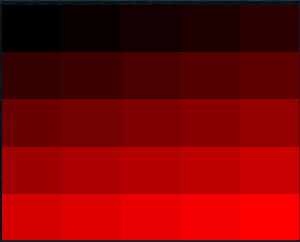
-- Create a new 5x5 grid
local myGrid = ui.Grid.new(parent)
myGrid:SetSize(200, 200)
myGrid:SetColumnRows(5, 5)

-- Fill each grid cell with a solid colour
local maxRect = grid.columns * grid.rows - 1
for i=0,maxRect do
    local rect = ui.Rectangle.new(grid)
    rect.colour = Vector4.new(i / maxRect, 0.0, 0.0, 1.0)
    rect.fill = true

    -- Have the rectangle occupy the entire cell
    rect:SetSize(0, 0, 1.0, 1.0)
end
Methods
Constructor
Creates a new Grid on the specified parent.
Warning
Creating a component can fail if there's already a component on that parent with the same category ID and dynamic ID, or if those are omitted and the application is unable to generate a valid ID for the component.
| Parameter | Type | Description |
|---|---|---|
| parent | ui.ComponentCollection | Parent component to create this grid in. |
| categoryID | Int? | Category ID used to identify this component. Defaults to the parent's category ID if not specified. |
| dynamicID | Int? | Dynamic ID used to identify this component. Defaults to auto-incrementing from the parent's dynamic ID if not specified. |
| Returns | Description |
|---|---|
| Grid | The newly created grid. The caller must set its layout and visual information afterwards. |
SetColumnRows
Makes the grid use a fixed number of columns and rows, and dynamically scales cell sizes based on that and the grid's dimensions.
Warning
Ideally this should only be called on empty grids, as calling this will request layout operations for all child components present on the grid.
| Parameter | Type | Description |
|---|---|---|
| columns | Int | The desired number of columns to use for this grid. |
| rows | Int | The desired number of rows to use for this grid. |
Example
SetCellSize
Makes the grid use fixed cell dimensions, and dynamically scales the number of columns and rows available based on that and the grid's dimensions.
Warning
Ideally this should only be called on empty grids, as calling this will request layout operations for all child components present on the grid.
| Parameter | Type | Description |
|---|---|---|
| width | Int | The desired width of each cell to use for this grid. |
| height | Int | The desired height of each cell to use for this grid. |
Example
Properties
| Name | Type | Description |
|---|---|---|
| cellWidth | Int | (Read-only) The width of each cell in this grid. |
| cellHeight | Int | (Read-only) The height of each cell in this grid. |
| columns | Int | (Read-only) The number of columns in this grid. |
| rows | Int | (Read-only) The number of rows in this grid. |
| hasFixedCellSizes | Bool | (Read-only) Indicates whether the cell size for this grid has been explicitly set via SetCellSize, resulting in dynamically calculated columns and rows values based on the grid's dimensions.Otherwise it's cellWidth and cellHeight that are dynamically calculated. |
| spacing | Int | The spacing in interface units between grid cells, both horizontal and vertical. |