ui.RadioGroup
Overview
ui.Component -> ui.RadioGroup
RadioGroup components are used to display a collection of options as a series of toggleable buttons.
They support an arbitrary minimum and maximum number of selected options, allowing for both the usual radio control's single selection behaviour, and for a more flexible selection limit, with selection changes triggering ONSELECTIONCHANGED events hooks.
They're ideal for situations where you have a set of mutually exclusive options, or want to allow users to mix and match multiple options (eg. category filters).
Example
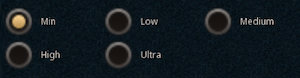
local columns = 3
local spacing = 5
local buttonSize = 40
local buttonLabelSpacing = 10

local c = ui.RadioGroup.new(parent, categoryID)
c.stylesheetID = radiogroup_style
c:SetSize(400, 200)
c:SetVisualParams(columns, spacing, buttonSize, buttonLabelSpacing)
c:Subscribe(ui.Hook.ONSELECTIONCHANGED,
    function(component, id, selectionChange)
        print("Selection event=" ..  tostring(selectionChange) .. " id=" .. tostring(id))
    end)

-- Add options
c:Add(0, "Min");
c:Add(1, "Low");
c:Add(2, "Medium");
c:Add(3, "High");
c:Add(4, "Ultra");
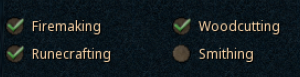
local options = { Firemaking = 0, Woodcutting = 1, Runecrafting = 2, Smithing = 3 }

local columns = 2
local spacing = 5
local buttonSize = 20
local buttonLabelSpacing = 5

local c = ui.RadioGroup.new(parent)
c.stylesheetID = radiogroup_check_style
c:SetSize(300, 150)
c:SetVisualParams(columns, spacing, buttonSize, buttonLabelSpacing)
c:SetSelectionLimits(0, 3)
c:Subscribe(ui.Hook.ONSELECTIONCHANGED,
    function(component, id)
        print("Selection is now " .. tostring(id))
    end)

c:SetOptions(options)

-- Setup default selections
c:SetOptionSelected(options.Smithing, false, false)
c:SetOptionSelected(options.Firemaking, true, false)
c:SetOptionSelected(options.Woodcutting, true, false)
c:SetOptionSelected(options.Runecrafting, true, false)
Methods
Constructor
function ui.RadioGroup.new(parent : ui.ComponentCollection, categoryID : Int?, dynamicID : Int?) -> RadioGroup
Creates a new radiogroup on the specified parent.
Warning
Creating a component can fail if there's already a component on that parent with the same category ID and dynamic ID, or if those are omitted and the application is unable to generate a valid ID for the component.
| Parameter | Type | Description |
|---|---|---|
| parent | ui.ComponentCollection | Parent component to create this radiogroup in. |
| categoryID | Int? | Category ID used to identify this component. Defaults to the parent's category ID if not specified. |
| dynamicID | Int? | Dynamic ID used to identify this component. Defaults to auto-incrementing from the parent's dynamic ID if not specified. |
| Returns | Description |
|---|---|
| RadioGroup | The newly created radiogroup. The caller must set its layout and visual information afterwards. |
Add
Adds an option to the radiogroup.
| Parameter | Type | Description |
|---|---|---|
| id | Int | Unique value identifying this option. |
| label | String | Text to display for this option. |
| Returns | Description |
|---|---|
| Bool | True if successful, false if an option with that ID already exists. |
Remove
Removes the option associated with this ID.
| Parameter | Type | Description |
|---|---|---|
| id | Int | Value used to identify the option to remove. |
| Returns | Description |
|---|---|
| Bool | Indicates whether or not an option was successfully removed. |
HasOption
Returns whether or not there's an option associated with the provided ID.
| Parameter | Type | Description |
|---|---|---|
| id | Int | Value associated with the option to check. |
| Returns | Description |
|---|---|
| Bool | True if there is an option corresponding to the provided ID, false otherwise. |
SetOptions
Clears existing options from the radiogroup and adds all options in the provided container to the radiogroup.
Warning
Entry IDs are expected to be unique, if the provided ID is already used by another option, this function will fail and return false.
| Parameter | Type | Description |
|---|---|---|
| entries | { String -> Int } | Table containing a mapping between option names and their IDs to add to the radiogroup. |
| Returns | Description |
|---|---|
| Bool | True if the provided options were valid and were successfully added to the radiogroup, false otherwise. This function can fail and return false due to the provided ID already existing, or due to invalid/malformed data. |
Example
GetSelectedValue
Gets the value/ID associated with the selectionIndex selected entry.
| Parameter | Type | Description |
|---|---|---|
| selectionIndex | Uint8 | Index into the currently selected entries collection to access. |
| Returns | Description |
|---|---|
| Int | The value/ID associated with the entry, or -1 if there are less than selectionIndex selected entries. |
GetSelectedLabel
Gets the text label associated with the selectionIndex selected entry.
| Parameter | Type | Description |
|---|---|---|
| selectionIndex | Uint8 | Index into the currently selected entries collection to access. |
| Returns | Description |
|---|---|
| String | The text label associated with the entry, or an empty string if there are less than selectionIndex selected entries. |
GetOptionEnabled
Gets whether the option associated with the specified ID is enabled and can be selected by the user.
| Parameter | Type | Description |
|---|---|---|
| id | Int | Value associated with the desired option. |
| Returns | Description |
|---|---|
| Bool | True if the desired option exists and is enabled, false otherwise. |
SetOptionEnabled
Sets whether the option associated with the specified ID is enabled and can be selected by the user.
| Parameter | Type | Description |
|---|---|---|
| id | Int | Value associated with the desired option. |
| enabled | Bool | Whether or not the option should be enabled and selectable by the user. |
| Returns | Description |
|---|---|
| Bool | True if the desired option exists, false otherwise. |
GetOptionSelected
Gets whether the option associated with the specified ID is currently selected.
| Parameter | Type | Description |
|---|---|---|
| id | Int | Value associated with the desired option. |
| Returns | Description |
|---|---|
| Bool | True if the desired option exists and is selected, false otherwise. |
SetOptionSelected
Sets whether the option associated with the specified ID is currently selected, optionally triggering selection events.
Info
This method obeys selection limits and will not make any changes if this would have resulted in the radiogroup being in an invalid state.
| Parameter | Type | Description |
|---|---|---|
| id | Int | Value associated with the desired option. |
| selected | Bool? | Whether or not the option should be selected currently. Defaults to false. |
| Returns | Description |
|---|---|
| Bool | True if the desired option exists, false otherwise. |
SetVisualParams
function ui.RadioGroup:SetVisualParams(numColumns : Uint8, spacing : Uint8, buttonSize : Uint8, buttonLabelSpacing : Uint8)
Sets the parameters used to position and layout the various options within this radiogroup.
| Parameter | Type | Description |
|---|---|---|
| numColumns | Uint8 | Number of columns to split the various radiogroup contents over. |
| spacing | Uint8 | Desired horizontal and vertical spacing between each option. |
| buttonSize | Uint8 | Controls whether to display options as toggle buttons or as checks. If set to 0, options are displayed as toggle buttons, otherwise this controls the size of the checkbox for each option. |
SetSelectionLimits
function ui.RadioGroup:SetSelectionLimits(minSelectedEntries : Uint8, maxSelectedEntries : Uint8) -> Bool
Changes the minimum and maximum number of selected options, without changing how many options are currently selected.
| Parameter | Type | Description |
|---|---|---|
| minSelectedEntries | Uint8 | Minimum number of entries that can be selected at any one time. |
| maxSelectedEntries | Uint8 | Maximum number of entries that can be selected at any one time. |
| Returns | Description |
|---|---|
| Bool | True if the minSelectedEntries and maxSelectedEntries form a valid range, where the minimum is less than or equal to maximum, and were set successfully, false otherwise. |
Properties
| Name | Type | Description |
|---|---|---|
| numSelected | Uint8 | (Read-only) The number of currently selected options. |
| selectedValues | [Int] |
(Read-only) Array containing the IDs or values of the currently selected entries. |
| selectedLabels | [String] |
(Read-only) Array containing the text labels of the currently selected entries. |
| entryMargin | ui.Margin | (Modifiable Contents) Offsets used to determine the inner content area within the regions for the individual options. |
| labelsText | ui.TextData | (Modifiable Contents) Text properties used when displaying option text labels. |
| buttonSprite | ui.SpriteData | (Modifiable Contents) Sprite properties used for the radiogroup's buttons. |
Custom Visuals
Radio groups can make use of the same sprites as check components since they're essentially identical in terms of functionality.
See here for information on how to create custom sprites that are usable by radio groups.