ui.Carousel
Overview
ui.Component -> ui.Carousel
Carousels contain a series of entries, and only display one at a time, allowing the user to switch between them via buttons to the left and right of the carousel's contents.
They're ideal for situations where you have a limited set of options that relate to eachother, such as game settings.
Entries can be displayed as either an icon, or as a text label, with support for mixing and matching within the same carousel.
Example

local c = ui.Carousel.new(parent)
c.stylesheetID = carousel_default
c:SetSize(200, 50)
c:Subscribe(ui.Hook.ONSELECTIONCHANGED,
    function(component, id, selectionChange)
        print("Selection event=" ..  tostring(selectionChange) .. " id=" .. tostring(id))
    end)

-- Add entries
c:Add(0, "Min");
c:Add(1, "Low");
c:Add(2, "Medium");
c:Add(3, "High");
c:Add(4, "Ultra");
Methods
Constructor
function ui.Carousel.new(parent : ui.ComponentCollection, categoryID : Int?, dynamicID : Int?) -> Carousel
Creates a new carousel on the specified parent.
Warning
Creating a component can fail if there's already a component on that parent with the same category ID and dynamic ID, or if those are omitted and the application is unable to generate a valid ID for the component.
| Parameter | Type | Description |
|---|---|---|
| parent | ui.ComponentCollection | Parent component to create this carousel in. |
| categoryID | Int? | Category ID used to identify this component. Defaults to the parent's category ID if not specified. |
| dynamicID | Int? | Dynamic ID used to identify this component. Defaults to auto-incrementing from the parent's dynamic ID if not specified. |
| Returns | Description |
|---|---|
| Carousel | The newly created carousel. The caller must set its layout and visual information afterwards. |
Add
function ui.Carousel:Add(id : Int, label : String) -> Bool
function ui.Carousel:Add(id : Int, iconSpriteID : Int) -> Bool
Adds an entry to the carousel.
| Parameter | Type | Description |
|---|---|---|
| id | Int | Unique numeric value identifying this entry. |
| label | String | Text to display for this entry. |
| iconSpriteID | Int | ID for the sprite to use as an icon for this entry. |
| Returns | Description |
|---|---|
| Bool | True if successful, false if an entry with that ID already exists. |
Clear
Removes all entries from the carousel.
HasEntry
Returns whether or not there's an entry associated with the provided ID.
| Parameter | Type | Description |
|---|---|---|
| id | Int | Numeric value associated with the entry to check. |
| Returns | Description |
|---|---|
| Bool | True if there is an entry corresponding to the provided ID, false otherwise. |
SetEntryEnabled
Sets whether or not the entry associated with the provided ID is enabled and can be selected.
| Parameter | Type | Description |
|---|---|---|
| id | Int | Numeric value associated with the entry to modify. |
| enabled | Bool | Whether or not the entry should be enabled and selectable. |
| Returns | Description |
|---|---|
| Bool | True if there was an entry corresponding to the provided ID, false otherwise. |
GetEntryEnabled
Returns whether or not the entry associated with the provided ID is enabled and selectable.
| Parameter | Type | Description |
|---|---|---|
| id | Int | Numeric value associated with the entry to access. |
| Returns | Description |
|---|---|
| Bool | True if there was an entry corresponding to the provided ID and it was enabled, false otherwise. |
Select
Selects the entry associated with the provided ID, and optionally triggers the corresponding ONSELECTIONCHANGED events.
| Parameter | Type | Description |
|---|---|---|
| id | Int | Numeric value associated with the entry to select. |
| triggerEvents | Bool? | Whether or not to emit ONSELECTIONCHANGED events for this change.Defaults to false. |
| Returns | Description |
|---|---|
| Bool | True if there was an entry corresponding to the provided ID, false otherwise. |
Properties
| Name | Type | Description |
|---|---|---|
| selectedID | Int | (Read-only) The numeric ID for the currently selected entry, or -1 if there is no selection. |
| buttonWidth | Uint16 | Width for the carousel's buttons in interface units. |
| buttonHeight | Uint16 | Height for the carousel's buttons in interface units. |
| buttonOffset | Uint16 | Offset in interface units from the left/right edges applied when positioning the carousel's buttons. |
| contentMargin | ui.Margin | (Modifiable Contents) Offsets used to determine the inner content area for this component. |
| entryText | ui.TextData | (Modifiable Contents) Text properties used when displaying entry text labels. |
| buttonSprite | ui.SpriteData | (Modifiable Contents) Sprite properties used for the carousel's buttons. |
| backgroundSprite | ui.SpriteData | (Modifiable Contents) Sprite properties used for the background. |
Custom Visuals
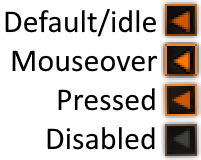
Using custom or plugin-provided sprites is supported, however the provided sprite must represent a spritesheet containing all of the potential states in a vertical layout using the following order - default, mouseover, pressed, disabled.