ui.ComboField
Overview
ui.Component -> ui.ComboField
These components allow users to select between various options, with support for filtering the displayed options based on text input, and triggering ONSELECTIONCHANGED events on selection.
Info
Prefer using dropdown lists instead of combofields when you don't need filtering functionality, for example when you're only dealing with a small number of entries.
Example
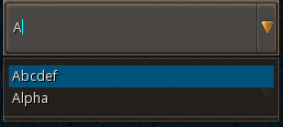
-- ComboField using explicit entry IDs
local c = ui.ComboField.new(parent)
c:SetSize(250, 50)
c.stylesheetID = combo_default
c:Add("Abcdef", 0);
c:Add("Alpha", 1);
c:Add("Beta", 2);
c:Add("Gamma", 3);
c:Add("Epsilon", 4);
c:Add("Vodka", 5);
c:Add("Lime", 6);
c:Add("Lemon", 7);
c:Subscribe(ui.Hook.ONSELECTIONCHANGED, function (comp, id, status) log("Changed selection for", id, "to", status) end)

-- And using the SetEntries API
local c = ui.ComboField.new(parent)
c:SetPos(0, 60)
c:SetSize(250, 50)
c.stylesheetID = combo_default
c:SetEntries({ "A", "B", "C", "D", "E", "F", "G" })
c:Subscribe(ui.Hook.ONSELECTIONCHANGED, function (comp, id, status) log("Changed selection for", id, "to", status) end)
Combo Entry
In most cases, entries must be modified through methods on the combofield itself, however you can also iterate through the combofield contents via the entries property, which returns a collection of entries. These are fairly limited and mostly provide an easy way to read the various properties for the various entries.
| Property | Type | Description |
|---|---|---|
| text | String | The label for this entry. |
| id | Int | (Read-only) The value for this entry. |
| selectable | Bool | (Read-only) Whether this entry can be selected. |
Methods
Constructor
function ui.ComboField.new(parent : ui.ComponentCollection, categoryID : Int?, dynamicID : Int?) -> Combo
Creates a new combofield on the specified parent.
Warning
Creating a component can fail if there's already a component on that parent with the same category ID and dynamic ID, or if those are omitted and the application is unable to generate a valid ID for the component.
| Parameter | Type | Description |
|---|---|---|
| parent | ui.ComponentCollection | Parent component to create this combofield in. |
| categoryID | Int? | Category ID used to identify this component. Defaults to the parent's category ID if not specified. |
| dynamicID | Int? | Dynamic ID used to identify this component. Defaults to auto-incrementing from the parent's dynamic ID if not specified. |
| Returns | Description |
|---|---|
| Combo | The newly created combo. The caller must set its layout and visual information afterwards. |
Add
Adds an entry to this combofield with the provided label and ID.
Warning
Entry IDs are expected to be unique, if the provided ID is already used by another entry, this function will fail and return false.
| Parameter | Type | Description |
|---|---|---|
| label | String | The text to display for this entry. |
| id | Int | Unique value used to identify this entry. |
| Returns | Description |
|---|---|
| Bool | True if the entry was added successfully, false otherwise. This function can fail and return false due to the provided ID already existing. |
Remove
Removes the entry associated with this ID.
| Parameter | Type | Description |
|---|---|---|
| id | Int | Unique value used to identify the entry to remove. |
| Returns | Description |
|---|---|
| Bool | Indicates whether or not an entry was successfully removed. |
Clear
Removes all entries from this combo.
UnselectAll
Clears the selection for this combofield.
Select
Selects the entry associated with the provided ID, and optionally triggers the corresponding ONSELECTIONCHANGED events.
| Parameter | Type | Description |
|---|---|---|
| id | Int | Numeric value associated with the entry to select. |
| triggerEvents | Bool? | Whether or not to emit ONSELECTIONCHANGED events for this change.Defaults to false. |
| Returns | Description |
|---|---|
| Bool | True if there was an entry corresponding to the provided ID, false otherwise. |
HasEntry
Returns whether or not there's an entry associated with the provided ID.
| Parameter | Type | Description |
|---|---|---|
| id | Int | Numeric value associated with the entry to check. |
| Returns | Description |
|---|---|
| Bool | True if there is an entry corresponding to the provided ID, false otherwise. |
SetEntries
function ui.ComboField:SetEntries(entries : [String], selectedID : Int?) -> Bool
function ui.ComboField:SetEntries(entriesMap : { String -> Int }, selectedID : Int?) -> Bool
Clears existing entries from the combofield and adds all entries in the provided container to the combo, optionally selecting the one with the provided ID.
Warning
Entry IDs are expected to be unique, if the provided ID is already used by another entry, this function will fail and return false.
| Parameter | Type | Description |
|---|---|---|
| entries | [String] |
Array of entry names to add to this combo. Their respective IDs are autogenerated using an auto-incrementing integer. |
| entriesMap | { String -> Int } |
Table containing a mapping between entry names and their IDs to add to the combo. |
| selectedID | Int? | ID for the entry to be selected afterwards. If this is an invalid ID or not specified, the first entry will be selected instead for lists that always require at least one selected entry (dropdowns for example). |
| Returns | Description |
|---|---|
| Bool | True if the provided entries were valid and were successfully added to the combo, false otherwise. This function can fail and return false due to the provided ID already existing, or due to invalid/malformed data. |
Properties
| Name | Type | Description |
|---|---|---|
| hasSelection | Bool | (Read-only) Indicates whether or not there is an entry currently selected. |
| selectedID | Int | (Read-only) The numeric ID for the currently selected entry, or -1 if there is no selection. |
| selectedLabel | String | (Read-only) The label for the currently selected entry, or an empty string if there is no selection. |
| entryHeight | Uint8 | Height for each displayed entry in interface units. |
| dropdownMaxVisibleEntries | Uint8 | How many entries can be displayed on the combofield's dropdown. |
| entries | [Combo Entry] | (Read-only) Array containing the entries present on this combofield. |
| numEntries | Int | (Read-only) Indicates how many entries are present on this combofield. |
| mouseoverForegroundColour | Vector4 | Colour used for the foreground when the cursor is positioned over an entry. |
| mouseoverForegroundRGBA | Uint | Hex-encoded red/green/blue/alpha colour code used for the foreground when the cursor is positioned over an entry. |
| mouseoverBackgroundColour | Vector4 | Colour used for the background when the cursor is positioned over an entry. |
| mouseoverBackgroundRGBA | Uint | Hex-encoded red/green/blue/alpha colour code used for the background when the cursor is positioned over an entry. |
| selectedForegroundColour | Vector4 | Colour used for the foreground for the currently selected entry. |
| selectedForegroundRGBA | Uint | Hex-encoded red/green/blue/alpha colour code used for the foreground for the currently selected entry. |
| selectedBackgroundColour | Vector4 | Colour used for the background for the currently selected entry. |
| selectedBackgroundRGBA | Uint | Hex-encoded red/green/blue/alpha colour code used for the background for the currently selected entry. |
| disabledForegroundColour | Vector4 | Colour used for the foreground of disabled entries. |
| disabledForegroundRGBA | Uint | Hex-encoded red/green/blue/alpha colour code used for the foreground of disabled entries. |
| caretColour | Vector4 | Colour used for the input section's caret. |
| caretRGBA | Uint | Hex-encoded red/green/blue/alpha colour code used for the input section's caret. |
| errorCaretColour | Vector4 | Colour used for the input section's caret when an error occurs. |
| errorCaretRGBA | Uint | Hex-encoded red/green/blue/alpha colour code used for the input section's caret when an error occurs. |
| selectionHighlightColour | Vector4 | Colour used for the input selection overlay. |
| selectionHighlightRGBA | Uint | Hex-encoded red/green/blue/alpha colour code used for the input selection overlay. |
| contentMargin | ui.Margin | (Modifiable Contents) Offsets used to determine the inner content area for this component. |
| headerMargin | ui.Margin | (Modifiable Contents) Offsets used to determine the inner content area for this component's dropdown header. |
| entryText | ui.TextData | (Modifiable Contents) Text properties used when displaying entries for this combo. |
| entrySprite | ui.SpriteData | (Modifiable Contents) Sprite properties used for the background. |
| buttonSprite | ui.SpriteData | (Modifiable Contents) Sprite properties used for the combofield's button. |
| headerSprite | ui.SpriteData | (Modifiable Contents) Sprite properties used for the combofield's header. |
| scrollbar | ui.ScrollBar | (Modifiable Contents) Scroll bar proprties used when vertical scrolling is required. |
Custom Visuals
Using custom or plugin-provided sprites is supported, however the provided sprites used for the header and button must represent a spritesheet containing all of the potential states in a vertical layout using the following order - default, mouseover, dropdown open, disabled.